SUPPORT
How can we help?
Most setup issues come down to a YouTube permission, a permission on your phone, or an unreliable network. Check the fixes below first — if you're still stuck, email us.
First-time setup
-
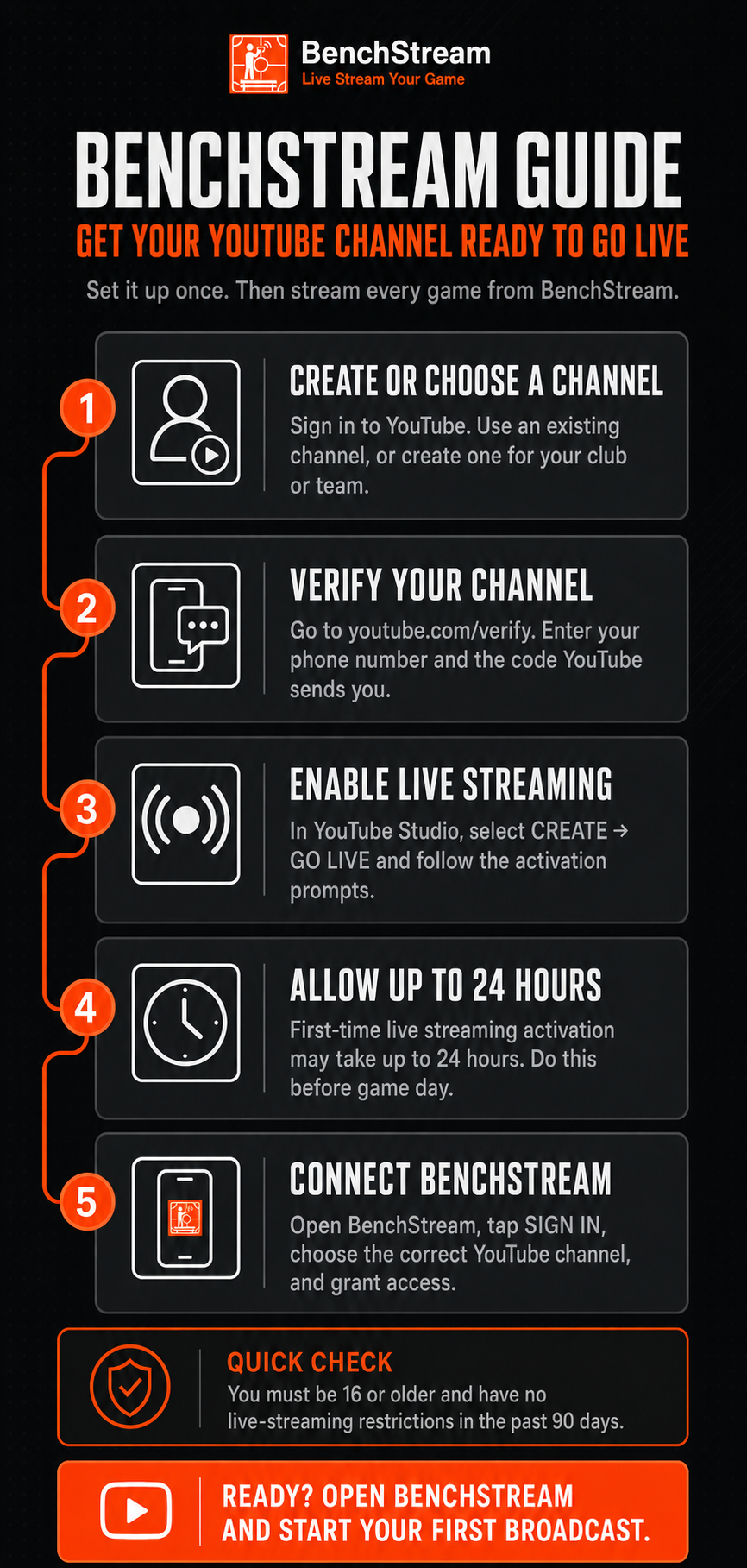
Enable YouTube Live on your channel
Go to youtube.com/features in a browser and turn on Live Streaming. YouTube can take up to 24 hours to approve a new channel for live, and may require phone verification.
-
Sign in with the right Google account
BenchStream uses Google sign-in with the YouTube permission needed to read and manage your live broadcasts. If you stream on a YouTube brand account (a separate channel from your personal one), choose that account at the sign-in prompt — not your personal Google account.
-
Grant camera and microphone permission
BenchStream needs camera and microphone access before capturing a broadcast. If you denied access, check BenchStream's permissions in your phone's Settings. The iOS draft includes permission preflight; physical-device prompts and recovery still require release verification.
Common fixes
-
Stream won't start
Confirm Live Streaming is enabled at youtube.com/features. Make sure BenchStream has camera and microphone permission. Try switching between Wi-Fi and cellular — rink and arena Wi-Fi is often the cause.
-
Stream keeps disconnecting
On Android, disable battery optimisation for BenchStream: Settings → Apps → BenchStream → Battery → Unrestricted. On iOS, keep BenchStream in the foreground with the screen on. Do not rely on continued camera capture, audio, or connection while switching apps or locking the screen; uninterrupted background streaming has not been verified. Try 4G/5G if Wi-Fi is shaky.
-
Audio sounds wrong
Run mic calibration before your stream. Tap Calibrate to this room in mic settings. In a loud arena, start with the level lower than you think — you can always increase it. If you are using a Bluetooth or USB microphone, select it explicitly in the mic settings panel before going live.
-
"The destination rejected this stream key"
For YouTube, prefer a scheduled broadcast rather than a manual key — BenchStream picks up the right key automatically. For a manual destination, double-check that the RTMP, HLS, or SRT details available in your app version match what your provider gave you. Keys are case-sensitive. Where SRT is enabled on Android, leave the passphrase empty because encrypted SRT is not currently interoperable with standard libsrt servers; use streamid authentication or network-layer encryption instead.
-
YouTube shows "Stream not live yet"
That message comes from YouTube. It means YouTube is receiving your stream but the broadcast has not yet been transitioned to live. BenchStream handles the transition automatically once ingest is stable; give it a few seconds.
-
Phone gets hot
Live encoding is intensive. Keep the phone out of direct sun, give it airflow if you have a mount, and lower the streaming resolution if needed. On Android only, turning the screen off can reduce screen power use while the broadcast continues. For iOS testing, keep the screen on and BenchStream in the foreground; do not lock it as a cooling workaround.
Account and data
-
Sign out
On Android, go to Settings → Account → Sign out. The unreleased iOS draft now offers confirmed Google disconnect in Profile, distinct from local sign-out. It requires Google's confirmation before clearing credentials, retains them on request failure for retry, and reports local cleanup failure separately. Revocation can affect other clients in the same Google OAuth project and take time to propagate. Real Google and physical-device verification remain release gates; local sign-out alone is not server revocation.
Signing out does not cancel Google Play Pro or App Store Pro. Cancel recurring billing through the store where you subscribed.
-
Delete your data
On Android, go to Settings → Account → Sign out to clear your Google tokens from the device. To revoke BenchStream's access to your YouTube account, also visit myaccount.google.com/permissions and remove BenchStream. On Android, uninstalling or clearing app data removes local app data. The unreleased iOS draft now offers a confirmed next-launch local reset in Profile, separate from Google disconnect. It can be cancelled before restarting and removes declared app files, images, caches, preferences and scoped current/legacy Keychain data before normal initialization; partial failure blocks entry for retry. System permissions, Safari sessions, remote data and backups are excluded. An isolated simulator restart check has passed; physical locked-device/interruption and real purchase-restoration verification remain release gates. SDK privacy review remains a release requirement, not release approval. Do not assume uninstalling erases all iOS data. Contact support if you need help with a test installation; see Privacy section 10 for the draft scope and limits. Our Delete your data page walks through every route in order, including the ones that work without the app.
Revoking access, changing a channel or Brand Account, clearing local data, and uninstalling do not cancel a store subscription or erase the store's transaction record.
BenchStream does not run a product database or central BenchStream account. App settings and credentials live on your device. Broadcasts created on YouTube remain in your YouTube account until you remove them in YouTube Studio. On Android, our purchase-verification provider RevenueCat creates an app-user and entitlement record when you choose to open a billing surface showing subscription prices or plan terms, so that record can exist even if you decide not to subscribe. Merely starting a broadcast does not contact RevenueCat. If you do subscribe, Google Play and RevenueCat also hold the resulting transaction and subscription records. See sections 7 and 10 of the privacy policy.
-
Data protection requests
For access, rectification, deletion, restriction, objection, portability, or automated-decision requests under UK or EU data-protection law, email support@bench-stream.com. We aim to reply within one month.
We retain support correspondence and attachments for up to 12 months after a request is resolved, unless we need to keep them longer for security, legal, accounting, or dispute-resolution reasons.
Subscriptions and billing
App Store download coming soon; iOS billing exists in draft source, not a public release. The planned iOS release includes Free and paid monthly or annual Pro, with no public trial. Purchase, Restore, offline access, payment recovery, plan changes, and active-stream billing behavior still need real purchase lifecycle verification on iOS. Production configuration and legal approval remain required. The Android instructions below do not establish those iOS behaviors.
-
Android and iOS purchases are separate
Google Play Pro works on Android only. Planned App Store Pro will work on iOS only. Subscriptions do not transfer, so Pro on both platforms will require a separate subscription from each store.
-
Your billing account can differ from YouTube
Subscription ownership follows the Google Play or Apple account used for purchase. On Android, check the account shown under your profile in the Play Store and on Google's payment sheet. That Google Play account owns Pro; the Google/YouTube sign-in, channel, or Brand Account selected in BenchStream does not. If Pro is missing, check the Play Store account first. Changing your streaming identity does not move, restore, or cancel the subscription.
-
Manage or stop the renewal of Google Play Pro
Open Google Play → your profile → Payments and subscriptions → Subscriptions → BenchStream, or use Google Play subscriptions. Cancelling stops the next renewal; Pro remains active until the paid period ends.
-
Apple subscription guidance for future purchases
App Store Pro is not available to buy yet. For a subscription billed by Apple, open Settings → your name → Subscriptions → the subscription → Cancel Subscription. If there is no Cancel button or an expiry message appears, Apple says it is already cancelled. If you cannot find it, check the Apple Account on the receipt. See Apple's cancellation guidance. These are Apple's account steps, not verification of BenchStream's iOS purchase or paid-through access.
-
Restore Android Pro after reinstalling or on a new phone
On Android, open BenchStream's Pro screen and tap Restore Purchases while the Play Store is signed in to the Google account that bought Pro. A fresh install may show Free until you do this because the new installation does not yet have the old installation's local entitlement record. You do not need to choose the same YouTube account or Brand Account.
Restore stays on the same platform: a Google Play purchase cannot be restored on iOS, and an App Store purchase cannot be restored on Android.
-
Purchase still pending
A pending purchase does not unlock Pro. On Android, check its status in Google Play and wait for Google Play to confirm it. Pro switches on automatically when the entitlement becomes active; do not treat the pending message as a completed purchase.
-
Payment retry, grace period, or account hold
Google Play handles renewal payment retries. During a grace period, Pro stays on while Play retries the payment. If the grace period ends and Play puts the subscription on account hold, Pro locks after BenchStream receives a definitive fresh result from the store.
Open Google Play → Payments and subscriptions → Subscriptions → BenchStream to check the subscription and payment method. Once Google Play shows the subscription as active again, return to BenchStream's Pro screen and tap Restore Purchases.
-
Using Pro offline and after expiry
On Android, if this installation has a cached, confirmed Pro entitlement, losing the network does not turn Pro off. BenchStream keeps that last confirmed access rather than treating a failed store check as a cancellation.
If the subscription expires while the phone is offline, the cached state can remain until the next successful check. Reconnect, then reopen BenchStream or return to the setup screen. If a check fails, return to setup again after a short delay. You can also tap Restore Purchases on the Pro screen.
-
Permanent Free tier
Free has no time limit and requires no payment method. BenchStream does not currently offer a public trial; subscribing to Pro starts the paid monthly or annual plan shown by the store.
-
Change your plan
Where the app offers it, you can move between the monthly and annual plans without cancelling first. On Google Play the change applies immediately in both directions, and only the timing of the money differs.
Monthly to annual charges the full annual price straight away. Whatever was left of your month is added onto the end of your new annual billing period. No money is refunded or credited, so if you were expecting a partial refund for the days you had not used, you will not see one: you receive that value as extra time instead.
Annual to monthly charges nothing on the day you switch. Monthly billing starts on the date your annual subscription would otherwise have renewed, so you keep every day you have already paid for.
Google shows the amount and the date before you confirm, and what it shows is what happens. iOS plan changes still require real purchase verification; do not apply these Google Play settlement rules to Apple purchases.
-
Refunds
Which route depends on what you are asking for. If you are exercising a statutory right, including the UK 14-day right to cancel or a claim that Pro was faulty or not as described, email support@bench-stream.com directly. For Google Play statutory requests: You never have to approach the store first and we will not send you back there. If you simply want a discretionary refund and speed matters, the originating store's own process is often quicker: use Google Play's refund flow or Apple's Report a Problem service. For future Apple-billed purchases, see our Apple cancellation and refund guidance. You may contact us about a fault or statutory claim without first using Apple's process. Store processes do not limit statutory rights you may have against BenchStream as the supplier; Apple-specific trader duties remain under legal review.
The Google Play route, in full. UK buyers can ask Google directly: open Google Play → your profile → Payments and subscriptions → Budget and order history, find the order and choose Report a problem. Google says a decision usually takes one to four days. Google also publishes a withdrawal form for UK and EEA buyers. Neither is a condition of anything: you can always come to us instead.
United Kingdom: the 14-day right to cancel is a separate thing from cancelling a renewal. Cancelling in Google Play stops future charges and returns no money. The statutory right is a distance-selling right that does not depend on anything being wrong, and you do not have to give a reason for it. You may use the model cancellation form in Part B of Schedule 3 to the Consumer Contracts (Information, Cancellation and Additional Charges) Regulations 2013, which we reproduce on the Refunds page, but the form is not obligatory and any clear statement will do. Pro is digital content rather than a service, so the proportionate charge that applies to a part-performed service does not apply to it.
On Android, a purchase that Google Play reports as refunded or revoked no longer provides Pro. BenchStream applies that result after its next successful entitlement check when the app starts or returns to setup, rather than treating a network error as a revocation.
-
Paid, but Pro is not unlocked
On Android, confirm the Play Store is signed in to the Google account that bought Pro, then check your network and tap Restore Purchases on BenchStream's Pro screen. Do not change your YouTube account or Brand Account to troubleshoot billing. If Pro still does not appear, email us with the platform, purchase date, and the exact message shown. Do not send payment-card details.
-
Billing changes during an active stream
On Android, an entitlement change never interrupts an active stream. If Pro is granted, expires, enters account hold, or is revoked while you are live, BenchStream holds the stream's existing access until the broadcast finishes. The change applies after the stream ends.
-
Signing out or uninstalling
Signing out, revoking YouTube, changing a channel or Brand Account, clearing app data, and uninstalling do not cancel billing. Use the originating store instructions above to cancel.
Reporting a concern
BenchStream is a streaming client — we do not host or moderate streams. If you have a concern about content broadcast through YouTube, please use YouTube's reporting flow, which is where moderation decisions are made.
For concerns about BenchStream itself — misuse, safety, abuse, or anything that needs our attention — email support@bench-stream.com.
Contact
Found a bug? Have a feature request? Need help with something that isn't covered above? Send us an email. Please include your phone model, the OS version, the BenchStream version (Settings → About), and a short description of what happened — it makes the back-and-forth much faster.
Please do not send stream keys, passwords, or unnecessary screenshots of other people's personal data. If we need logs or screenshots to diagnose a problem, we will use them only for support, security, legal, or service-maintenance purposes.
support@bench-stream.com — we aim to reply within three business days. Data-protection requests within one month.
English language only. Times are UK business hours.